Instagram DM Automation: Turn Comments Into DMs Automatically
Instagram engagement is valuable, but manually replying to every comment and direct message can quickly become a full-time job.
A creator publishes a Reel and asks followers to comment “LINK” to receive a free guide. A business posts a product and tells people to comment “PRICE” for more information. A social media manager runs the same strategy across several client accounts.
Then the comments start arriving.
Ten comments are manageable. A hundred become repetitive. A viral post can generate hundreds or even thousands of interactions.
That is where Instagram DM automation becomes useful.
Instead of manually reading every comment, replying publicly, opening the user's profile, and sending a private message, an Instagram automation tool can handle the entire process automatically.
With Schedly.ai Comment & DM Automations, you can create workflows that react to Instagram comments or incoming DMs, detect keywords, publish automatic replies and send private messages without manually handling every interaction.
In this guide, we'll explain how Instagram comment-to-DM automation works, what you can automate, how keyword triggers work and why creators and businesses are increasingly using automation to turn engagement into conversations.
What Is Instagram DM Automation?
Instagram DM automation is the process of automatically sending or responding to Instagram Direct Messages when a predefined event occurs.
For example, a user might:
- • comment on an Instagram post;
- • send a specific keyword through DM;
- • ask a frequently asked question;
-
• interact with a campaign that uses a keyword such as
LINK,GUIDE,INFOorPRICE.
The automation detects that interaction and performs the action you configured.
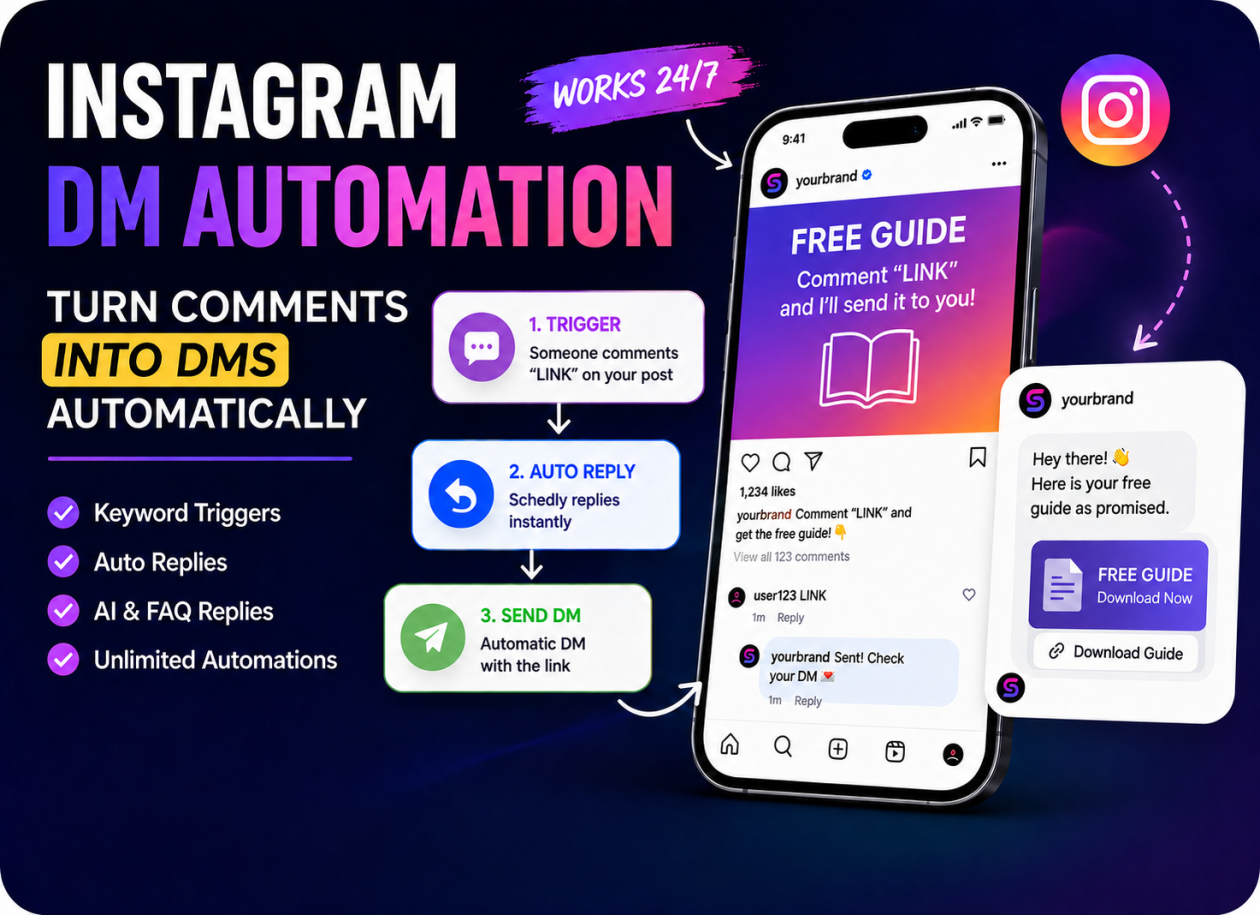
A basic workflow might look like this:
Follower comments “LINK” → automatic public reply → private DM sent with the requested link.
Instead of responding manually, the automation handles the conversation immediately.
Keyword-triggered Instagram automations are widely used for lead generation, discounts, support, product recommendations and free resources. Keywords essentially act as entry points into an automated conversation.
What Is Instagram Comment-to-DM Automation?
Instagram comment-to-DM automation specifically connects public post engagement with private Instagram messages.
Imagine you publish a Reel saying:
Comment “GUIDE” below and I'll send you the free guide.
When someone comments GUIDE, the workflow can automatically:
- 1) detect the comment;
- 2) confirm that it matches the keyword;
- 3) publish a public reply such as “Check your DM! 💌”;
- 4) send the guide privately through Instagram DM.
The entire process can happen within seconds.
This is useful because public comments increase visible engagement while the private DM gives you a more direct communication channel with the follower.
For creators, coaches, agencies, ecommerce stores and service businesses, it creates a simple bridge between content engagement and lead generation.
Why Automate Instagram Comments and DMs?
The biggest reason is simple: speed and scale.
If someone comments asking for information, they are usually interested at that exact moment.
Replying six hours later is very different from replying immediately.
Instagram keyword automation allows businesses to provide instant responses even when nobody is actively monitoring the account.
1. Faster responses
Automations can reply immediately after someone interacts.
That means users do not have to wait for a business owner or social media manager to open Instagram.
2. Less repetitive work
Many Instagram interactions are repetitive:
- • “Can you send me the link?”
- • “How much is it?”
- • “Where can I download this?”
- • “Can I get the guide?”
- • “Do you ship internationally?”
Automating these conversations can remove a large amount of manual work.
3. Better lead generation
Instead of telling followers to click a link somewhere else, you can invite them to engage directly with the post.
For example:
“Comment PRICE and I'll DM you the details.”
The follower performs a simple action and the automation continues the conversation privately.
4. Works around the clock
Your audience does not only interact during business hours.
Automation can continue responding during evenings, weekends or periods of high engagement.
How Schedly.ai Instagram Comment & DM Automations Work
Schedly.ai lets you build Instagram automations using a simple step-based workflow.
You first decide what should trigger the automation.
Trigger from an Instagram comment
The automation can run when someone comments on:
- • Specific Posts
- • Any Post
- • Future Posts
This makes it possible to create one campaign for a particular Reel or build an automation that automatically applies to future content.
Trigger from a Direct Message
You can also start an automation when someone sends your Instagram account a DM.
For example:
User sends “PRICE” → Schedly sends pricing information automatically.
This works well for Story CTAs such as:
DM me “START” for more information.
Instagram Keyword Automation
One of the most useful features is keyword-triggered automation.
You can configure the automation to run when a comment:
- • Contains any keyword
- • Exactly matches a keyword
- • is Any comment
This gives you much more control over when an automation starts.
For example, you might use:
-
• LINK -
• GUIDE -
• INFO -
• PRICE -
• DEMO -
• DISCOUNT -
• START
Keyword automations are effective because the user clearly signals what they want.
ManyChat itself describes Instagram keywords as specific words or phrases that trigger automated conversations, and recommends simple campaign-specific keywords that are easy for users to remember.
Control How Often an Automation Runs
Automation needs limits at the user level so the same person does not accidentally receive the same response repeatedly.
Schedly lets you choose how often the same person can trigger the workflow:
- • Once per post
- • Once every 24 hours
- • Every matching comment
This is particularly useful when a follower leaves multiple comments on the same post.
For a lead magnet campaign, Once per post might make sense.
For support or conversational use cases, you may prefer a different trigger frequency.
Automatically Reply to Instagram Comments
A Comment & DM Automation does not have to immediately jump into a private message.
You can first publish an automatic public reply.
Example:
Follower:
“LINK”
Automatic reply:
“Check your DM! 💌 Just sent you the details.”
This serves two purposes.
First, the user knows the automation worked.
Second, other people reading the comments can see that users are receiving the requested resource.
From there, the workflow can continue privately.
Automatically Send Instagram DMs
The next step is the private DM.
You can use it to deliver:
- • links;
- • downloadable guides;
- • booking pages;
- • discount codes;
- • product information;
- • offers;
- • lead magnets;
- • instructions;
- • custom messages.
For example:
Hey! 👋 Here's the guide you requested.
[Your link]
The follower receives the content immediately without you manually sending every message.
AI-Powered Instagram Replies
Not every Instagram comment fits a simple keyword rule.
Someone might ask:
Is this available in Europe?
Another person may say:
This looks great, but does it work for agencies?
For these situations, AI replies can provide more natural automation.
Schedly AI can understand the incoming comment and generate a response using the tone and language you configure.
That means Instagram automation does not have to feel like a collection of robotic keyword responses.
You can combine predefined automation rules with AI-powered replies depending on the type of interaction.
FAQ-Based Auto Replies
Businesses often receive the same questions repeatedly.
For example:
- • What are your opening hours?
- • How much does this cost?
- • Where are you located?
- • Do you offer a free trial?
- • Does this work for multiple accounts?
Schedly allows you to configure FAQ-based responses.
When an incoming message matches one of those questions, the system can use the predefined answer.
This is particularly useful when you want consistent answers rather than fully generated AI responses.
Instagram DM Automation for Creators
Creators can use automation for much more than customer support.
One of the most popular use cases is content-based lead generation.
For example:
Free prompt
Post CTA:
Comment “PROMPT” and I'll send you the exact prompt.
Automation:
PROMPT comment → public reply → DM with prompt
Free guide
Post CTA:
Comment “GUIDE” to get the full PDF.
Automation:
GUIDE → reply → private download link
Affiliate offers
Post CTA:
Comment “TOOL” and I'll send you the software I use.
The automation sends the affiliate link privately.
Course or coaching leads
Post CTA:
Comment “START” if you want the details.
The DM can send information about the offer or direct the user to a booking page.
Instagram DM Automation for Businesses
Businesses can use the same workflows differently.
An ecommerce company might use:
Comment “PRICE” → send product details
A restaurant might use:
DM “MENU” → send menu link
A real estate account could use:
Comment “DETAILS” → send property information
A SaaS company might use:
Comment “DEMO” → send demo/signup link
The principle remains the same:
Engagement triggers an immediate, relevant response.
Schedly.ai as a ManyChat Alternative
ManyChat is one of the best-known tools in social messaging automation and supports Instagram comment-to-DM and keyword flows.
However, many creators search for a ManyChat alternative because contact-based pricing can become more expensive as engagement grows.
This search intent has become particularly visible in 2026, with several recent comparison guides focusing specifically on ManyChat alternatives and flat-rate Instagram DM automation tools.
Schedly takes a different approach.
The $19/month plan includes up to 5 active Comment & DM Automations with unlimited triggers and comments.
That distinction matters.
Imagine you have one Instagram automation:
Comment “LINK” → receive DM.
If the Reel gets 2,000 matching comments, you do not want the success of the post itself to become a pricing problem.
With Schedly, the plan limit is based on how many automations you keep active — not how many comments trigger them.
Higher plans can support more active automations while keeping triggers unlimited.
This creates a predictable model for creators, agencies and businesses running high-engagement campaigns.
Schedly also combines automation with broader social media tools, including scheduling, AI content creation, analytics and other social media management features.
So rather than using one tool for content creation, another for scheduling and another for Instagram DM automation, businesses can manage more of the workflow from one platform.
ManyChat vs Schedly: Which Should You Choose?
ManyChat remains a powerful choice for businesses that need deeper chatbot-style workflows across multiple messaging channels.
Schedly is especially compelling when your primary needs are:
- • Instagram comment automation;
- • Instagram DM automation;
- • comment-to-DM campaigns;
- • keyword-triggered DMs;
- • AI comment replies;
- • FAQ-based replies;
- • social media scheduling;
- • AI content creation;
- • predictable automation limits.
If you are already using Instagram CTAs such as:
“Comment LINK and I'll send it to you”
then Schedly is designed around that exact workflow.
Best Practices for Instagram Comment Automation
Automation works best when the user understands exactly what to do.
Use simple keywords
Choose short, memorable words.
Good examples include:
LINK, GUIDE, PRICE, DEMO, START
Avoid unnecessarily complicated phrases.
Make the CTA obvious
Do not hide the instructions.
Use clear language such as:
Comment “GUIDE” below and I'll DM it to you.
Deliver what you promised immediately
If someone comments LINK, the DM should contain the link.
Avoid forcing users through an unnecessarily long conversation before delivering what they requested.
Keep replies natural
Automated messages should still sound like your brand.
A simple:
Hey 👋 Here you go!
usually feels better than an overly formal automated response.
Test your workflow
Before publishing the campaign, test the keyword, public reply and DM to confirm everything behaves as expected.
Final Thoughts
Instagram is increasingly becoming a conversation-driven platform.
Followers do not simply consume content. They comment, ask questions, request links and send DMs.
The challenge is handling those interactions quickly when your audience grows.
Instagram Comment & DM Automation turns those interactions into automated workflows.
Instead of manually responding to every LINK, GUIDE, PRICE or INFO comment, you can configure the automation once and let it run in the background.
With Schedly.ai, you can trigger automations from Instagram comments or DMs, use keyword rules, publish automatic replies, send private messages, use AI-generated responses and answer common questions through FAQs.
Whether you are a creator generating leads, an agency managing multiple accounts or a business trying to respond faster, automation can help turn Instagram engagement into real conversations without adding more repetitive work.
Want to try it?
You can test Instagram Comment & DM Automations free with the Schedly trial plan.
Start your free trial at Schedly.ai and create your first Instagram automation.
Share: